

Choosing a wireless remote control for hydraulic machinery starts with the machine, not the remote. The most important questions are how the hydraulic functions are currently controlled, which movements need proportional speed control, what electrical signals the machine can accept, and what operating conditions the system must withstand.
A wireless hydraulic remote control can range from a simple push-button transmitter for basic raise/lower functions to a multi-axis proportional joystick system for cranes, excavators, concrete pump trucks, and other machinery requiring controlled variable movement. Selecting the wrong control architecture can result in poor machine response, difficult installation, or an incompatible hydraulic interface.
A practical selection process should therefore examine the machine’s hydraulic circuit, control functions, electrical interface, safety requirements, operating environment, radio requirements, and operator workflow before a specific transmitter and receiver are selected.
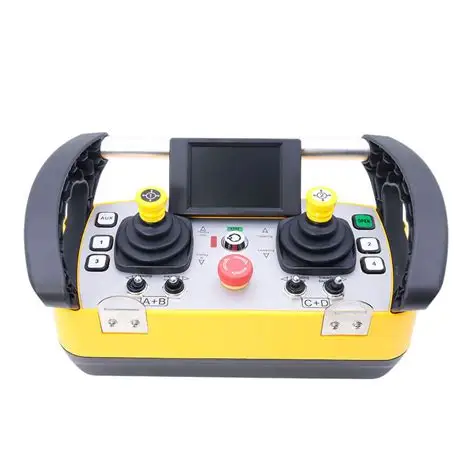
1. Start With the Hydraulic System, Not the Transmitter
One of the most common purchasing mistakes is choosing the transmitter first.
A buyer may know that the machine needs two joysticks, eight buttons, or a particular operating range. That information is useful, but it does not tell the supplier how the remote must communicate with the machine.
The first question is:
How are the hydraulic functions controlled today?
Depending on the machine, the existing system may use:
- Manual spool valves.
- Hydraulic pilot controls.
- Solenoid-operated directional valves.
- Proportional hydraulic valves.
- Electro-hydraulic controls.
- PLC-based control systems.
- CAN-based electronic control systems.
- A combination of mechanical and electronic controls.
These systems do not necessarily accept the same remote-control outputs.
For example, replacing a manual hydraulic lever with a wireless transmitter is fundamentally different from connecting a receiver to an existing proportional electro-hydraulic valve.
Before requesting a quotation, identify the existing valve and control architecture whenever possible.
Information to collect from the machine
| Information | Why it matters |
|---|---|
| Machine type and model | Establishes the general control architecture |
| Hydraulic functions | Determines the required number of channels |
| Valve type | Determines the required interface |
| Solenoid voltage | Determines electrical compatibility |
| Solenoid current | Determines receiver/output requirements |
| Existing controller | May determine communication requirements |
| Machine supply voltage | Determines receiver power compatibility |
| Existing manual controls | Determines whether a retrofit or parallel control system is required |
| Hydraulic circuit documentation | Helps prevent incorrect valve/interface selection |
| Photos of valves and control cabinet | Allows the supplier to identify hardware |
If the valve model is unknown, clear photographs of the valve bank, solenoid labels, existing controller, connectors, and electrical cabinet can be useful during the initial technical evaluation.
Nomi’s current hydraulic remote-control material similarly recommends documenting the number and type of functions, valve and solenoid specifications, machine voltage, environment, required operating range, radio requirements, and applicable safety standards before selecting a retrofit system.
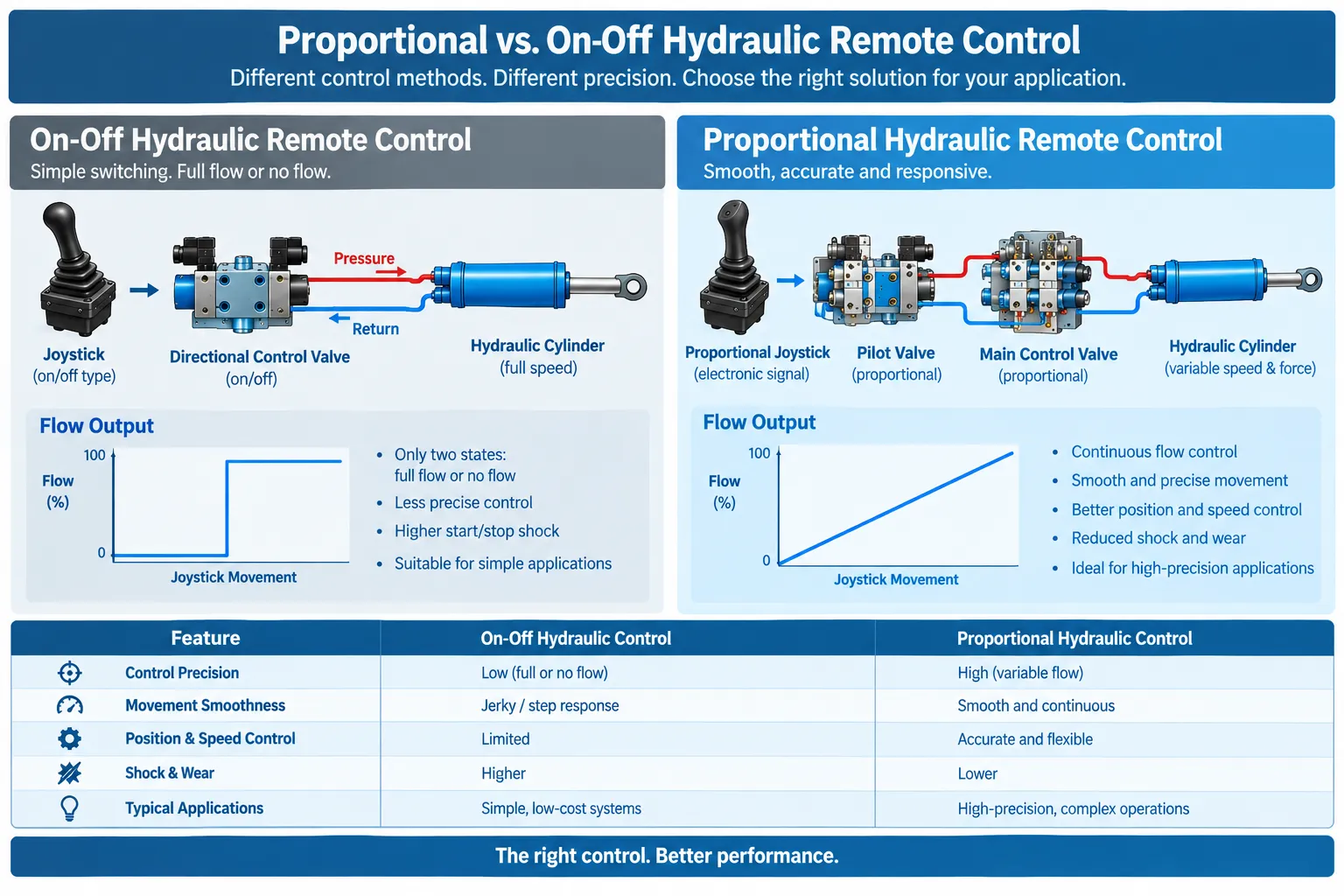
2. Decide Whether You Need Proportional or On/Off Control
The next major decision is the type of movement the operator needs.
There are three common approaches:
- On/off control
- Proportional control
- Hybrid control
On/off control
On/off control provides a discrete command.
The function is activated or deactivated rather than continuously varied.
This can be suitable when the machine only needs commands such as:
- Raise
- Lower
- Extend
- Retract
- Start
- Stop
- Open
- Close
- Auxiliary output
For simple hydraulic applications, adding proportional control may introduce unnecessary complexity if the operator does not actually need variable movement.
Proportional control
Proportional control allows the operator to vary the command according to joystick or control position.
This becomes useful when the operator needs to:
- Approach a position slowly
- Control hydraulic movement smoothly
- Adjust boom or arm speed
- Control a winch gradually
- Coordinate several hydraulic movements
- Position a load accurately
- Reduce abrupt movement during operation
The important point is that a proportional joystick alone does not automatically make a hydraulic machine proportional.
The complete system must support proportional control.
The transmitter generates a variable command, the receiver processes that command, and the downstream electrical or hydraulic interface must translate it into an appropriate machine response.
Hybrid control
Many machines do not fit neatly into one category.
For example, a machine may need proportional joysticks for its primary hydraulic movements while using push buttons for:
- Horn
- Lights
- Engine functions
- Auxiliary equipment
- Mode selection
- Pump functions
- Other discrete commands
A hybrid transmitter can therefore be more practical than forcing every function into the same control method.
Proportional vs. on/off selection
| Requirement | On/Off | Proportional | Hybrid |
|---|---|---|---|
| Simple raise/lower | ✓ | Possible | ✓ |
| Variable hydraulic speed | Limited | ✓ | ✓ |
| Precision positioning | Limited | ✓ | ✓ |
| Basic auxiliary functions | ✓ | Possible | ✓ |
| Multiple hydraulic axes | Possible | ✓ | ✓ |
| Simple system | ✓ | More complex | Moderate |
| Mixed machine functions | Limited | Limited | ✓ |
The correct choice depends on the machine and task, not on which control type appears more advanced.
3. Count Functions Before Counting Buttons
The number of buttons or joysticks is important, but it should come after the machine functions have been identified.
Start by making a list of every function that the operator needs to control remotely.
For example:
| Machine function | Direction | Control requirement |
|---|---|---|
| Boom | Up / down | Proportional |
| Winch | Up / down | Proportional |
| Slew | Left / right | Proportional |
| Extension | In / out | Proportional |
| Horn | On / off | Button |
| Lights | On / off | Button |
| Auxiliary valve | On / off | Button |
This approach is more useful than simply telling a supplier, “I need a six-button remote.”
Two machines can have the same number of functions but require completely different transmitters.
One machine may need four proportional axes.
Another may need six simple relay outputs.
A third may need proportional hydraulic control plus several auxiliary buttons.
Think in terms of axes
For joystick systems, an axis represents a direction of variable control.
A two-axis joystick can typically provide two independent movement directions, depending on the system architecture.
When specifying a remote, clarify:
- Number of joysticks
- Number of axes
- Proportional or discrete operation
- Whether axes can operate simultaneously
- Whether additional buttons are required
- Whether auxiliary outputs are required
This gives the supplier enough information to determine the appropriate transmitter and receiver architecture.
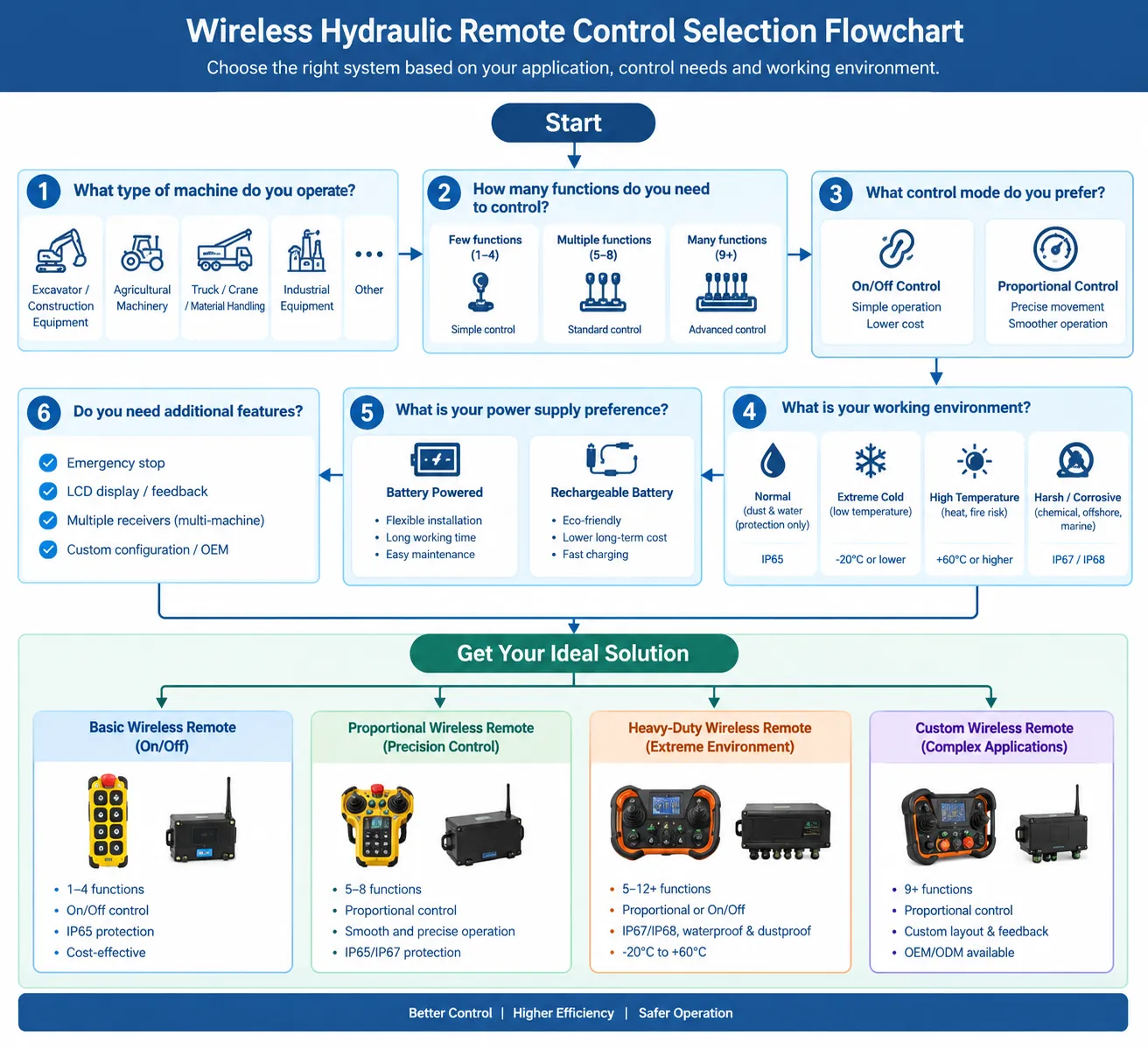
4. Check the Hydraulic Valve and Electrical Interface
This is one of the most important technical checks in a hydraulic remote-control project.
The wireless system ultimately needs to communicate with the machine’s control system.
Depending on the equipment, the receiver may need to provide different types of outputs, such as:
- Relay outputs
- Digital outputs
- Proportional outputs
- Analog signals
- Controller communication
- Other machine-specific interfaces
The exact output should be determined by the machine’s existing control architecture.
What should you ask about the valve?
If the machine uses solenoid-operated hydraulic valves, collect:
- Valve manufacturer
- Valve model
- Coil voltage
- Coil current
- Connector type
- Number of coils
- Proportional or non-proportional operation
- Existing amplifier or driver
- Wiring diagram if available
For proportional valves, also determine how the existing system generates and controls the proportional command.
A remote-control supplier should not have to guess the valve interface from the machine name alone.
Why this matters
Consider two machines that are both described as “hydraulic excavators.”
They may have very different control architectures.
One may already use electronic joysticks and an electronic controller.
Another may use a different hydraulic control arrangement.
A universal-looking transmitter does not automatically mean universal machine compatibility.
The receiver and interface are just as important as the handheld transmitter.
5. Select the Right Transmitter Configuration
Once the control architecture is understood, the physical transmitter can be selected.
Common formats include:
Handheld joystick transmitter
A handheld joystick transmitter is useful when the operator needs several proportional hydraulic functions in a compact control device.
It can be appropriate for:
- Hydraulic cranes
- Excavators
- Concrete pump equipment
- Mobile machinery
- Other multi-axis hydraulic systems
Nomi currently offers industrial joystick remote-control solutions intended for proportional control applications involving cranes, excavators, and heavy machinery.
Push-button transmitters are generally better suited to discrete commands.
Typical functions include:
- Raise/lower
- Start/stop
- Forward/reverse
- Auxiliary equipment
- Simple hydraulic functions
They can be a practical choice when the machine does not require continuous speed modulation.
Body-worn or belly-box configuration
For machines requiring many controls or prolonged operation, a larger body-worn transmitter can provide more physical space for:
- Multiple joysticks
- Push buttons
- Selector switches
- Emergency-stop functions
- Displays or indicators
The best format depends on the operator’s working position and the number of simultaneous controls.
6. Do Not Choose Operating Range by the Largest Number
“100 m range,” “300 m range,” or “1000 m range” may look attractive on a product specification sheet, but range alone is not enough to determine whether a wireless remote is suitable.
Actual radio performance depends on the installation and operating environment.
Factors can include:
- Buildings
- Steel structures
- Walls
- Machinery
- Terrain
- Antenna position
- Electromagnetic interference
- Radio frequency regulations
- Receiver installation
- Antenna configuration
A machine operating in an open yard may have very different communication conditions from one operating inside a steel-processing plant.
Instead of asking only:
“What is the maximum range?”
ask:
“What reliable operating distance is required under the actual installation conditions?”
Also clarify whether the stated distance is:
- Line-of-sight range
- Maximum laboratory or open-area range
- Typical working range
- Range under a specified environmental condition
A supplier should be able to explain what the quoted range represents.
7. Consider Radio Frequency and Interference
Wireless industrial equipment operates within a regulated radio environment.
The appropriate frequency and radio configuration depend on the country or region where the equipment will be operated.
For international projects, do not assume that a frequency used in one country can automatically be used in another.
The buyer should confirm:
- Country of installation
- Applicable radio regulations
- Frequency band
- Required approvals or conformity requirements
- Potential interference sources
- Whether several wireless systems operate nearby
For machinery operating close to other wireless systems, communication reliability and system identification become particularly important.
A good system should also prevent one transmitter from unintentionally controlling another machine.
This is especially important in factories, construction sites, ports, and other environments where multiple machines may operate simultaneously.
8. Evaluate Safety as Part of the Complete Machine System
A wireless remote control should not be evaluated as a standalone safety device.
The safety of the complete machine depends on the interaction between:
- Transmitter
- Receiver
- Communication link
- Machine controller
- Hydraulic valves
- Actuators
- Emergency-stop architecture
- Interlocks
- Machine guarding
- Operating procedures
- Maintenance
- Operator training
For example, if communication with the transmitter is lost, the machine needs a defined response appropriate to its safety design.
Likewise, an emergency-stop function needs to be considered as part of the machine’s safety-related control system, rather than simply assuming that an emergency-stop button on the transmitter automatically makes the entire machine compliant.
ISO 13849-1:2023 provides a methodology and requirements for designing and integrating safety-related parts of control systems, including systems using electrical, hydraulic, pneumatic, and mechanical technologies. It also makes clear that the required safety functions and performance levels are application-specific rather than universally defined by the standard.
For this reason, buyers should ask the supplier:
- How is loss of communication handled?
- What happens when the transmitter battery becomes critically low?
- What happens if the transmitter is switched off?
- What happens if the receiver loses power?
- How is unintended activation prevented?
- How is emergency stop implemented?
- Which parts of the safety function are inside the remote system?
- Which safety functions remain part of the machine itself?
- Which standards or conformity requirements apply to the complete installation?
Do not treat a statement such as “complies with ISO 13849” as a substitute for reviewing the actual safety architecture.
Read more: How Does a Hydraulic Proportional Remote Control Work?
9. Check the Environmental Conditions
Hydraulic machinery is often used outdoors or in harsh industrial environments.
The remote control may be exposed to:
- Rain
- Dust
- Mud
- Oil
- Hydraulic fluid
- Vibration
- Mechanical shock
- Temperature changes
- Direct sunlight
- Cold weather
- Heat
- Frequent handling or drops
This is where the enclosure and environmental specifications become important.
Important environmental specifications
| Specification | What to check |
|---|---|
| IP rating | Resistance to dust and water ingress |
| Operating temperature | Minimum and maximum ambient temperature |
| Shock resistance | Suitability for handling and machinery vibration |
| Vibration resistance | Suitability for mobile equipment |
| Housing material | Resistance to industrial handling and environment |
| Battery system | Battery life and replacement/charging method |
| Connector protection | Suitability for outdoor installation |
| Antenna protection | Mechanical and environmental durability |
Do not select an IP rating simply because it is the highest number available.
The correct question is whether the protection level is appropriate for the actual environment.
10. Check the Machine Power Supply
The receiver needs to be compatible with the machine’s electrical system.
Industrial hydraulic machinery may use different supply voltages, and the remote system should be specified accordingly.
Before ordering, confirm:
- Machine voltage
- Receiver operating voltage
- Transmitter battery type
- Charging method
- Battery operating time
- Low-battery indication
- Charging requirements
- Whether a spare battery is practical
For mobile machinery, battery management is particularly important because the machine may operate away from a convenient charging location.
A remote control that works technically but requires frequent charging may not be practical for a high-cycle operation.
11. Think About Operator Ergonomics
Technical specifications do not tell the whole story.
The operator may use the transmitter for several hours per shift.
Important ergonomic considerations include:
- Joystick position
- Button spacing
- Grip design
- Control direction
- Display visibility
- Glove compatibility
- Weight
- Strap or harness configuration
- Emergency-stop accessibility
- Accidental activation protection
Control layout should also match the operator’s mental model of the machine.
If the physical arrangement of controls is confusing, the operator may spend more time looking at the transmitter rather than observing the machine and work area.
For a complex machine, a well-organized control layout can be more valuable than simply adding more functions.
12. Decide Whether You Need a Retrofit or a New Control System
A wireless remote-control project can generally fall into two broad categories.
Retrofit
The existing machine remains largely unchanged and the wireless system is integrated into its existing control architecture.
This can be attractive when:
- The machine already has suitable electro-hydraulic controls
- The existing hydraulic system is functioning correctly
- The operator wants wireless control without replacing the machine
- The required interface can be integrated safely
New control architecture
A more extensive project may require changes to:
- Hydraulic valves
- Electrical control panels
- Controllers
- Wiring
- Safety circuits
- Operator controls
This approach may be necessary when the original machine was not designed for the required remote-control architecture.
Do not assume that every machine can be converted by simply installing a wireless receiver.
The feasibility depends on the existing hydraulic and electrical design.
13. What Information Should You Send a Supplier?
If you want an accurate quotation, avoid sending only:
“I need a wireless remote for my excavator.”
Instead, provide as much of the following information as possible.
Hydraulic remote-control RFQ checklist
Machine
- Machine type
- Manufacturer
- Model
- Year, if relevant
Hydraulic system
- Valve manufacturer
- Valve model
- Hydraulic functions
- Proportional or on/off functions
- Solenoid voltage
- Solenoid current
- Existing controller
Remote-control requirements
- Number of joysticks
- Number of joystick axes
- Number of buttons
- Proportional functions
- Auxiliary functions
- Emergency-stop requirements
- Simultaneous functions required
Electrical system
- Machine voltage
- Existing wiring
- Connector information
- Control cabinet photographs
- Wiring diagram if available
Operating environment
- Indoor or outdoor
- Temperature range
- Dust/water exposure
- Vibration
- Required IP protection
Wireless requirements
- Required operating distance
- Country of installation
- Potential radio interference
- Number of machines operating nearby
Commercial information
- Quantity
- Required delivery date
- Destination country
- Required certifications or documentation
- OEM or private-label requirements, if applicable
This information gives the supplier a much better basis for selecting the transmitter, receiver, and interface.
14. Common Mistakes When Buying a Wireless Hydraulic Remote
More buttons do not automatically mean a better remote.
Start with machine functions and control requirements.
Mistake 2: Assuming proportional control is always better
Proportional control can be valuable when variable movement is required.
For simple on/off applications, it may add complexity without providing a meaningful operational benefit.
Mistake 3: Ignoring the hydraulic valve
The transmitter is only one component.
The valve and electrical interface determine whether the machine can respond correctly to the remote command.
Mistake 4: Choosing only by maximum range
Maximum range figures do not describe every real-world installation.
Evaluate the actual distance, obstacles, antenna arrangement, and electromagnetic environment.
Mistake 5: Treating IP rating as the entire environmental specification
IP protection addresses specific ingress conditions. It does not by itself describe resistance to temperature, vibration, mechanical shock, chemicals, or long-term industrial use.
Mistake 6: Assuming every certification applies to the complete machine
A certification or conformity statement for one component does not necessarily mean that the complete machine installation meets every applicable requirement.
Always distinguish between:
- Product certification
- Component conformity
- System design
- Machine-level compliance
Mistake 7: Buying before checking the machine voltage
The remote receiver and machine electrical system must be compatible.
This should be confirmed before ordering.
Mistake 8: Sending too little information to the supplier
A vague inquiry often leads to a generic quotation.
Providing valve information, photographs, wiring details, function lists, and operating conditions can make the technical evaluation much more accurate.
15. A Practical Wireless Hydraulic Remote Selection Process
A useful selection sequence is:
Step 1: Identify the machine
Determine the machine type, model, and application.
Step 2: Map the hydraulic functions
List every movement that needs wireless control.
Step 3: Classify each function
Mark each function as proportional, on/off, or hybrid.
Step 4: Identify the valve interface
Record valve type, solenoid specifications, controller type, and available documentation.
Step 5: Confirm the electrical system
Verify machine voltage and receiver requirements.
Step 6: Define the transmitter
Choose joystick, push button, body-worn, or another configuration based on the actual workflow.
Step 7: Define the wireless requirements
Specify working distance, country, operating environment, and possible interference.
Step 8: Define safety requirements
Determine emergency-stop behavior, communication-loss behavior, interlocks, and machine-level safety requirements.
Step 9: Check environmental requirements
Confirm temperature, dust, water, vibration, shock, and enclosure requirements.
Step 10: Ask for system compatibility confirmation
Before purchase, ask the supplier to confirm that the proposed transmitter, receiver, interface, and machine control system are compatible.
This process is much more reliable than choosing a remote based on a product photo or a list of buttons.
16. When Should You Consider a Proportional Wireless Hydraulic Remote?
A proportional system may be worth considering when the operator needs controlled variable movement rather than simple activation.
Typical examples include:
- Hydraulic cranes
- Excavators
- Concrete pump equipment
- Material-handling machinery
- Mobile hydraulic equipment
- Machines requiring several coordinated hydraulic movements
Nomi’s product range currently includes industrial hydraulic remote-control systems, joystick remote controls, construction crane remote controls, and concrete pump truck remote-control solutions. The appropriate configuration should still be determined from the machine’s actual hydraulic and electrical interface rather than from the application name alone.
For example, a hydraulic crane may require proportional boom, winch, extension, and slew control, while auxiliary functions may remain on/off.
A concrete pump truck may have a different combination of proportional hydraulic functions and discrete controls.
The machine’s existing control architecture ultimately determines the appropriate system.
17. When Is a Simple Push-Button Remote Enough?
A simpler push-button system can make sense when the machine’s functions are fundamentally discrete.
Examples may include:
- Simple raise/lower applications
- Auxiliary hydraulic functions
- Basic pump control
- Simple winch functions
- Dump trailer functions
- Other applications where variable speed is not required
Nomi currently offers push-button remote-control products alongside its proportional and joystick systems, allowing the control architecture to be matched to the application.
The important point is not to purchase more functionality than the machine and operator actually need.
18. What Should You Verify Before Placing the Order?
Before approving a wireless hydraulic remote-control system, verify the following:
| Area | Verification |
|---|---|
| Machine | Exact machine model and application |
| Hydraulic system | Valve type and control method |
| Functions | Number of proportional and digital functions |
| Electrical | Supply voltage and solenoid specifications |
| Transmitter | Joystick/button layout |
| Receiver | Output type and interface |
| Wireless | Frequency and required operating distance |
| Environment | IP, temperature, vibration and shock requirements |
| Safety | Emergency stop and communication-loss behavior |
| Regulations | Country-specific radio and machinery requirements |
| Installation | Wiring, mounting and commissioning requirements |
| Documentation | Wiring diagram, manual and applicable conformity documents |
| Support | Spare parts, troubleshooting and technical support |
If any of these points remain unclear, resolve them before finalizing the purchase.
Frequently Asked Questions
Not necessarily.
A proportional remote is preferable when the operator needs variable hydraulic movement. A push-button remote can be more appropriate when the required functions are simple on/off commands.
Can any hydraulic machine be controlled wirelessly?
No.
The feasibility depends on the machine’s hydraulic and electrical architecture. The valve type, control method, solenoid characteristics, machine voltage, safety system, and installation conditions all need to be evaluated.
How many joysticks do I need?
The answer depends on the number and type of hydraulic axes that need to be controlled.
Do not determine joystick quantity only from the machine type. Map the actual hydraulic functions first.
What is the most important specification when choosing a hydraulic remote?
There is no single specification that is most important for every machine.
For many projects, hydraulic interface compatibility is a better starting point than operating range or button count because an incompatible interface cannot provide the required machine control.
Is a longer wireless range always better?
No.
The required range should be based on the actual working distance and environment. A very high maximum range does not automatically mean better performance at every installation.
What IP rating should an industrial hydraulic remote have?
The required protection depends on the operating environment.
Outdoor construction equipment, indoor factory machinery, washdown environments, and dusty industrial applications may have different requirements. Confirm the actual environmental conditions before selecting the enclosure rating.
Can I retrofit a wireless remote onto an existing hydraulic machine?
In many cases, a retrofit can be considered, but feasibility depends on the existing hydraulic and electrical system.
The valve interface, solenoid configuration, machine controller, safety architecture, and available installation space should be evaluated first.
What information should I send when asking for a quotation?
At minimum, provide the machine model, required hydraulic functions, proportional or on/off requirements, machine voltage, valve information, required operating distance, operating environment, country of installation, and photographs of the existing control system.
The more complete the technical information, the less likely the supplier is to quote an unsuitable configuration.
Does a wireless remote replace the machine’s safety system?
No.
A wireless remote is part of the machine-control architecture. Machine safeguards, emergency-stop functions, interlocks, risk assessment, guarding, operating procedures, and other applicable safety measures still need to be addressed at the machine/system level.
Conclusion
Choosing a wireless remote control for hydraulic machinery is not primarily a question of how many buttons, how many joysticks, or how many meters of wireless range a product offers.
The better approach is to start with the machine.
First identify the hydraulic functions. Then determine which functions require proportional control and which only need on/off commands. Next, verify the hydraulic valve and electrical interface, machine voltage, wireless requirements, operating environment, safety architecture, and installation conditions.
Only after those points are understood should the transmitter and receiver configuration be selected.
For buyers evaluating an industrial [hydraulic remote control system], the most useful information to provide a supplier is therefore not simply “I need a wireless remote.” A machine model, hydraulic function list, valve information, electrical specifications, photographs, required control layout, operating environment, and destination country provide a much stronger basis for selecting the correct system.
Nomi provides industrial wireless remote-control solutions for hydraulic machinery, including [joystick remote controls], [push-button remote controls], [construction crane remote controls], and [concrete pump truck remotes]. The appropriate solution depends on the machine’s actual control architecture and operating requirements rather than on a generic remote-control specification.
